One library. Everything in it.
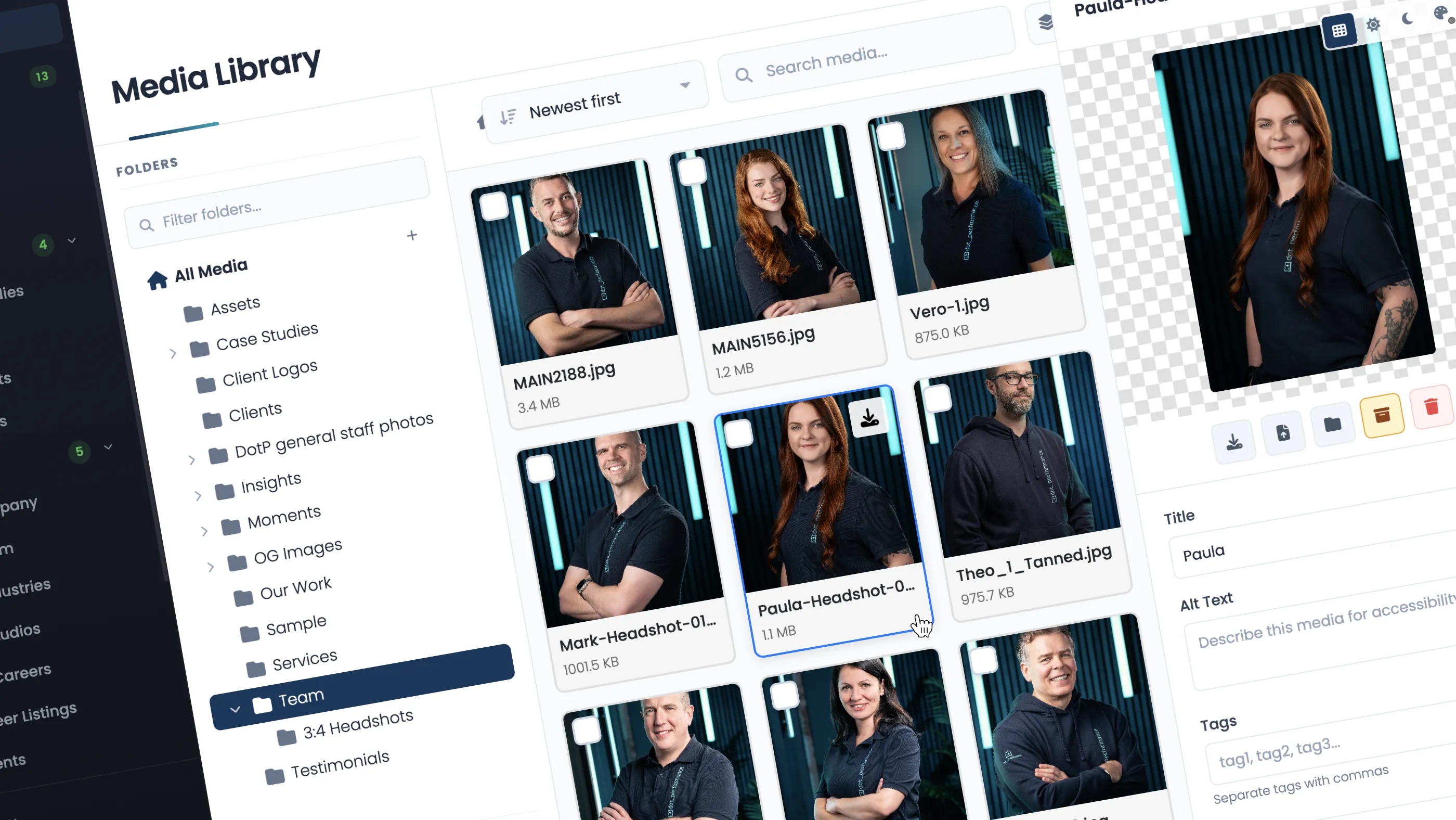
Every image, video, document, logo, icon and brand asset lives in a single, centralised library. Not spread across tools. Not duplicated in email threads. Not saved locally on someone's machine. One place, accessible to everyone who needs it, organised properly from day one.
The library is built on AWS S3, so storage is not a constraint. You are not rationing space or archiving old assets to free up room. Everything stays. Everything is available. And because S3 handles redundancy automatically, nothing gets lost.
Tagging and metadata
This is where the library becomes genuinely useful rather than just tidy.
Every asset can be tagged, categorised and enriched with metadata. That means when someone searches for "headshot" or "product" or "2025 rebrand" or "homepage hero," they find what they need immediately. No scrolling through folders. No guessing file names. No opening twenty thumbnails to find the right one.
Good tagging turns a media library from a storage system into a working tool. It means a new team member can find the right assets on their first day. It means your social media manager is not messaging your designer every time they need an image. It means the right version of the right file is always findable.
Metadata also matters for the website itself. Alt text, titles and descriptions can be managed at the asset level so that when an image is placed on a page, the relevant information follows it. That improves accessibility, supports search performance, and removes one more thing the content editor has to remember to do manually.
Building a beautiful asset bank
There is a difference between storing files and building an asset bank. Storing files is reactive. You upload things when you need them and hope you can find them later. Building an asset bank is deliberate. You are creating a curated, searchable, well-organised collection that represents your brand properly.
The media library in DotP CMS is designed to encourage that second approach. The interface is clean. Drag and drop upload makes adding assets simple. Tagging and search make retrieval instant. Version control means the library stays current without losing history. When a logo is updated, the old version is still there if you need it, but the current version is clearly the current version.
Over time, what you build is not just a folder of files. It is a complete visual record of your brand, organised well enough that anyone in the organisation can use it confidently.
Automatic optimisation in the background
When an image is uploaded, DotP CMS handles the technical work automatically. The original file is preserved as the master. Responsive variants are generated for different screen sizes. The image is converted to modern formats including WebP and AVIF so the browser always receives the most efficient version it supports.
None of this requires any input from the person uploading. They add the asset, tag it, and move on. The system delivers it properly wherever it is used on the site.
Why it matters
Centralising your media is not an admin task. It is a strategic one. When your assets are organised, tagged, and easy to find, your team moves faster. Content gets published sooner. Brand consistency improves because people are using the right assets instead of whatever they can find quickest. And the website performs better because every image is optimised automatically.
Most CMS platforms treat media as a secondary concern. DotP CMS treats it as the starting point. Because if your team cannot find, manage and use their own assets efficiently, everything else slows down.